In 2026, for beginners, a budget-friendly autoresponder I recommend is the Home Business Academy’s built-in mailing module. For beginners, it replaces the need for a third-party service like AWeber, GetResponse, or MailChimp.
Coupled with their 2026 AI update, HBA is superb value for beginners and those looking to keep costs down (which should be ‘everyone’ in this day and age).
You can build and manage your own email list, create campaigns and sequences, send broadcasts, and connect forms to your funnels, all in one place. It works on credits instead of a monthly fee. You get 300 free credits when you activate it, each email uses 1 credit, and you can buy 15,000 credits for $15 when you need more.
There’s no annual fee, just the very affordable $25pm, which also allows you to build up to 50 funnels. (Yes, that sounds like overkill, but I built 5 in the first week of having access to the feature, so why restrict your growth?)
Cost of HBA Autoresponder
The HBA Funnel Builder and Emailer (aff link) together cost $25 pcm.
Email costs with HBA:
There will be small credit costs to use the emailer – here is how the email charges work:
• 300 free credits one-time when you activate the Emailer (a one-time bonus, not a monthly allowance)
• Each email sent uses 1 credit
• Extra credits: 15,000 credits for $15 – so, send 15,000 emails for $15.
You can hold as many contacts in the HBA Emailer as you want, and your list can keep growing.
Compare that against the price of the popular mainstream auto-responders, which are priced on the size of your list, and may seem a bit daunting when you’re first starting to email your subscribers.
HBA’s pricing is built differently. You pay per email sent, not for the size of your list. There’s no monthly or annual fee, and you can have as many subscribers as you like.
As Your List Grows
It’s tempting to be excited about ‘hold as many contacts as you want’, and that is attractive, but remember that you are charged for every email sent (15,000 emails for $15) so consider that when deciding which auto-responder to use.
If you have a list of 1,000, sending 15 emails per month would cost you $15.
So whether HBA or a flat-rate service is better value depends on how often you plan to send emails – do your own calculations.
But for beginners, and most people starting to build their first list, the HBA auto-responder is an economical solution and includes the funnel builder too.
Probably most important of all, for a beginner: the instructions for getting your email verified for sending (DKIM, DMARC, SPF, bounces) were handled by HBA’s emailer and support bot. I just copy-pasted them to my domain host.
Keep an eye on your costs, and if mailing from HBA starts to exceed the cost of using AWeber, you can export from HBA and import to AWeber, another straightforward process.
How Was an HBA Import Handled?
Anyway, I was paying for an auto-responder that didn’t have many subscribers, and more importantly, I was getting a poor open rate – despite them supposedly having verified all the settings necessary for safe emailing.
So I decided to test out the HBA emailer, as well as cutting a monthly subscription, and I ran an import.
It was very straightforward; I just exported a CSV from GetResponse and imported it to HBA. Fields were mapped across automatically, and here’s the result below.
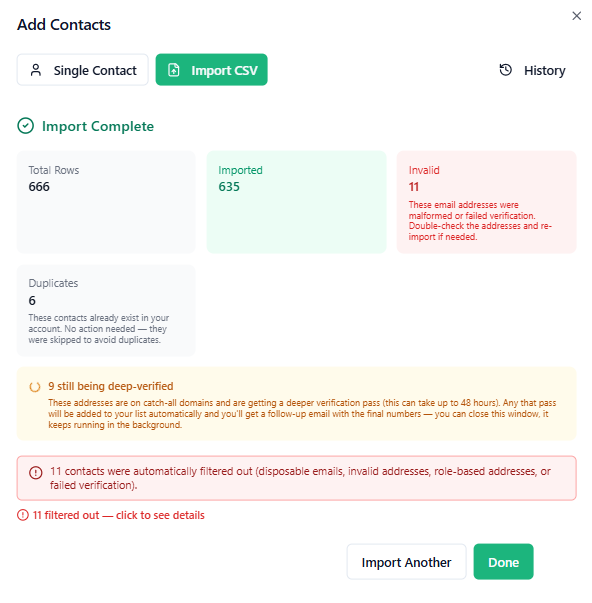
There was a cost of 2c per email to verify the subscribers I was importing, so I can be sure they are valid emails. As you can see above, a few were filtered out as invalid. So I won’t be paying to send to invalid emails.
The only glitch I should have remembered is that role-based addresses are excluded at import (eg support@xxx.com), but the support team told me how to fix that by allowing support-based roles on sign-up forms. Only one of my contacts was affected.
What About Sending From Your Own Domain?
It’s recommended to use your own custom domain as early as possible in your online career, and I’ve had my own domain for years now.
So one of my concerns was about my subscribers starting to receive an email from the HBA default sender after I had been telling them to whitelist my ‘proper’ email.
I raised this with the HBA AI support bot, expecting it to tell me to raise a support ticket for a human to check, but no! It promptly replied:
Yes, Joy, it’s possible, and it’s the best option for what you’re describing. Your subscribers already recognise your main email, so sending from it keeps things familiar for them. Your own domain also builds its own sending reputation, which is better for deliverability than the shared default partner email address, which simplifies setup for people without a domain.
To set it up:
- Go to the Emailer settings
- Find the Sending Identities card and click “Add an email address” and enter your own email address.
- If it is registered through Domain Scout, HBA sets up the records for you. If it’s registered somewhere else, keep it there. HBA will show you the records to add where your domain’s DNS is managed, then it verifies them. When the address shows as ready / verified, click “Make default” next to it so your campaigns send from it.
- A new domain starts with no sending history of its own. For the first few weeks, open rates can look low or uneven until you’ve emailed consistently. To help, email your list regularly and send only to people who signed up to hear from you.
- Your campaigns will all go out from your own email address once you make it the default and it passes the HBA verification. If there are any problems, I’ll open a support ticket for a human to check it out.
I’m still impressed by how ‘smart’ the HBA’s AI Bot ‘Sage’ is.
Deliverability from HBA Autoresponder
I sent my first email to the newly imported list, and even before I had realised/remembered that I could do the verification above to use my own domain, at 23.3% I saw a great improvement in deliverability from the average of 7% I was getting on my previous auto-responder.
The other thing to note is that with HBA ‘Perfect Timing’ comes as standard (i.e. emails are sent at the time your subscriber is most likely to open them – on past performance), whereas some other auto-responders charge extra for that.
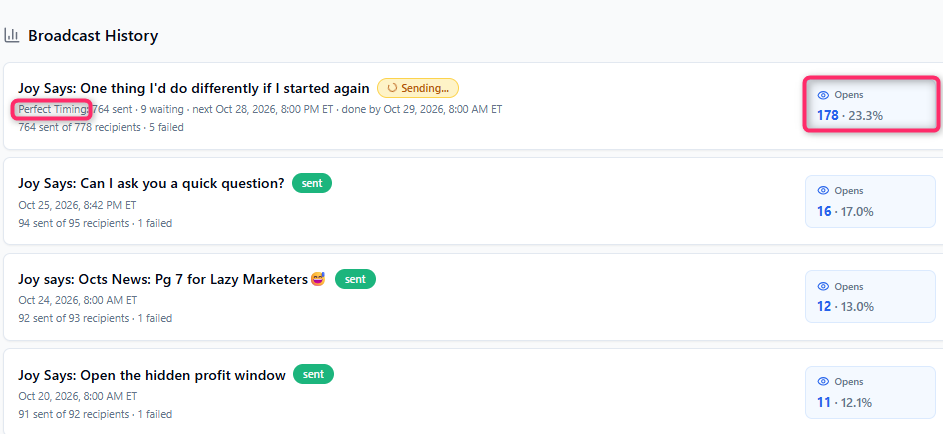
All the above were sent before I did proper verification of my email, which has now been done.
Of course, opens don’t mean sales, but if your emails don’t get opened, there’s no chance of sales.
So in conclusion, the value of the Funnel Builder and the funnel builder for just $25 pcm is perfect for anyone wishing to start an online business.
A Quick Note About AWeber and the ClickBank Profit Club
I promote two main businesses.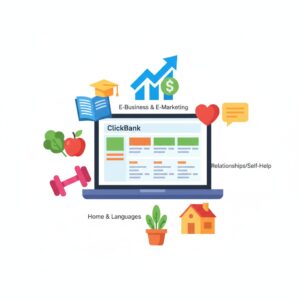
- CBPC has been my main business since April 2026, when it was founded by a 9x Platinum ClickBank vendor. The value of making ClickBank sales is that there are many affiliate products you can sell in different niches than the ‘make money online’ niche, where many people seem to end up, and that was my reason for joining it. To escape the MMO marketplace.
- The Home Business Academy is a series of tools and trainings that I was using BEFORE the ClickBank Profit Club came along. HBA has always had a funnel builder suitable for building businesses outside the MMO marketplace, but until a few weeks ago, the training was defeating many people.
I realised the synergy when HBA revamped their Funnel Builder and added an AI builder to set up your funnels.
Should you combine the two?
If you are a member of the ClickBank Profit Club, I still recommend using AWeber because the CBPC creator bases all his automations on AWeber. Although different autoresponders are supported, using a different one would create significant extra work.
You can open a free account at the ClickBank Profit Club here, and you can watch an excellent and concise video explaining why and how every email marketer needs to build their own email list and blog.