A budget-friendly place to build a blog – with pros and cons
You can build a blog on a small budget, using a free hosted platform or paid hosting with WordPress. For seniors and pre-retirees exploring affiliate income, it’s a flexible side project that can fit around family, hobbies and other commitments.
So for instance of you wanted to blog about your holiday, as one friend did, a free site was perfect for him, and we all enjoyed following his trip and experiences.
You don’t need to become a technical expert before publishing. You do need somewhere comfortable to write, a manageable budget and a willingness to help your readers. WordPress.com, Blogger, Wix and self-hosted WordPress.org each offer a different balance of simplicity and control, so let’s look at what you’re getting for your money.
If you are planning for your blog to be part of any business, that’s different, so let’s keep expectations sensible. A cheap platform lowers your expenses; it doesn’t provide readers, sales or guaranteed income. Affiliate marketing pays when someone uses your tracked link and completes a qualifying purchase or action.
Key Takeaways
- You can start with a free blog, although platform branding, a restricted web address and fewer features may come with it.
- WordPress.com and Blogger reduce setup work, whilst self-hosted WordPress.org gives you more control and more responsibility.
- Wix makes website building approachable, but a custom domain requires a paid plan and moving elsewhere takes planning.
- Budget for renewals, your domain, hosting and useful extras. A low introductory price doesn’t tell the whole story.
- Publish helpful content before buying more tools. Affiliate earnings depend on relevant readers and suitable recommendations, never the platform alone.
Where to build a blog on a budget: pros and cons
Prices and plan features change. The useful distinction is between a free starting point and the ongoing cost of running your blog.
Free platforms keep costs down, but can limit control
Blogger provides free hosting and a blogspot.com address. WordPress.com also offers a free plan, with hosting handled for you.
Both let you practise publishing without a hosting bill. That’s useful when you’re learning and haven’t settled on your subject.
The trade-off is control. Free hosted plans can restrict branding, extra features and monetisation choices.
Another price of ‘free’ is that WordPress.com may place advertising on free sites, so your readers may be lured away.
You’re also subject to the platform’s rules, so free hosting shouldn’t be treated as unrestricted business space.
Keep separate copies of your writing and images. Just in case.
Self-hosted WordPress offers more room to grow
WordPress.org’s publishing software is free and open source. You normally pay separately for hosting and a domain name.
You gain more freedom over design, affiliate links, email signup forms and plugins, which add features to your site. The downside? More decisions, plus responsibility for updates, security and backups. However if you choose your hosting company well, they will handle that for you.
I moved to managed WordPress hosting because reliable service and support mattered to me. Managed hosting can reduce maintenance work, although the tasks included depend on the package.
You can still begin with a simple theme and very few plugins.
Website builders trade flexibility for simplicity
Wix combines hosting with a visual editor, so you can arrange pages without handling a separate hosting account. That can make the first steps feel less intimidating.
Its free plan uses Wix branding and a platform-based address. Wix’s paid plans offer custom-domain connection and additional features.
The main drawback is portability. You can’t simply transfer a complete Wix website to another host. Moving usually involves rebuilding its design and transferring content.
Simplicity has value, provided you’re comfortable with that longer-term commitment.
Choose a blog home that fits your budget and plans
The best choice depends on how you want to work. Some readers enjoy learning WordPress; others would rather concentrate on writing.
Neither approach deserves a medal. Choose something you can manage without turning every publishing session into a technical battle.
Check the full cost, not just the starting price
Separate introductory offers from renewal charges. A discounted first year can look attractive whilst hiding a much larger ongoing commitment.
Your budget needs room for a domain, hosting or a platform subscription, and any extras you actually use. Paid themes, plugins and email services are separate expenses unless included.
Calculate what you’ll spend over six months, including renewals that fall within that period. Then set a yearly ceiling that feels comfortable alongside your retirement spending.
Affiliate links themselves don’t require a shopping cart. Transaction fees become more relevant if you later sell your own products.
Don’t buy a bundle because its list of features looks impressive. Unused software still costs money.
Think about ownership and affiliate features
Keep your domain registered in an account you control. Keep copies of your content too. A custom address is helpful, but it doesn’t remove your dependence on hosting or platform rules.
For an affiliate blog, you need readable articles, working links and space for clear advertising disclosures. An email signup form may also matter when you’re ready to stay in touch with readers who have given permission.
Platform permission and affiliate-programme approval are separate matters. Being able to insert a link doesn’t mean every advertiser accepts your site.
A custom domain can move with you, but your design, forms and other features may need rebuilding.
Prefer the simplest plan that meets those needs. Extra flexibility is only worth paying for when you have a use for it.
Start small, then upgrade when your blog earns its keep
Choose a subject you understand well enough to explain patiently. Gardening, sewing, accessible holidays and practical home projects can all support helpful articles. Narrow the focus enough that readers know why they’ve arrived.
Then choose your platform and publish one useful post. Explain a task, answer a common question or compare products you genuinely understand. Give readers enough information to make a decision, including drawbacks.

Keep the design calm. Readable type, clear headings and straightforward navigation matter more than animated effects. Open your finished article on a phone as well as a computer; small text and awkward menus quickly become irritating.
Your blog can be your main home for useful content, with one social channel helping people discover it. Choose somewhere your intended readers already spend time. You don’t need accounts everywhere!
AI can help organise an outline or suggest questions you haven’t answered. Keep responsibility for the facts, recommendations and final wording. It cannot supply genuine product experience on your behalf.
A funnel builder or automation package may become useful later. Buying one before you know what your readers need adds another bill and another system to learn.
Record expenses from the beginning. As visitors arrive, watch which articles attract attention and whether affiliate clicks produce qualifying sales. Paid commissions matter more than an impressive-looking dashboard.
Choose offers because they suit your readers. A large advertised commission is little comfort when nobody wants the product.
Let those results guide your upgrades. Pay for better support if technical problems repeatedly interrupt you. Add email tools when you have a clear plan for using them. Give every new expense a job.
Frequently Asked Questions
Can I start a blog for free?
Yes. Blogger, WordPress.com and Wix offer free starting options, usually with a platform-branded web address. That’s enough to practise writing and publishing. A custom domain or paid plan becomes worth considering when platform restrictions interfere with how you want to run the blog. For instance, if you wish to run a business on it.
Is WordPress.com the same as WordPress.org?
No. WordPress.com is a hosted service, with hosting and much of the technical maintenance handled for you. WordPress.org provides software you install through a hosting provider, although managed hosting can reduce your workload. This WordPress.com and WordPress.org comparison explains their different responsibilities and options.
Do I need a custom domain before publishing?
No, you can publish using a platform-provided address and decide about a domain later. Your own domain can make the address easier to remember and give you a more consistent business identity. It won’t attract visitors or generate income by itself, so useful articles still deserve your attention first.
Can I use affiliate links on a free blog?
That depends on the platform’s terms and the affiliate programme’s rules; free hosting isn’t automatic permission for every promotion. WordPress.com allows affiliate links within original content, but restricts sites mainly created to send visitors elsewhere. UK ASA guidance requires affiliate advertising to be identifiable, so make the commercial relationship clear before readers engage with it.
How much time should I spend on a new blog?
One useful post a week or a fortnight is a sensible starting rhythm, particularly if you’re learning the software too. Allow time for research, editing and replying to readers, rather than counting writing time alone. If that schedule becomes tiring, slow down instead of filling the blog with rushed articles.
Choose a platform you can afford and enjoy using
A budget-friendly place to build a blog should suit both your finances and your comfort with technology. Free platforms offer a practical start, whilst paid hosting and builders exchange an ongoing bill for different levels of control, convenience and support.
You don’t have to make every decision perfectly before publishing. Keep your spending within a comfortable limit and give yourself time to learn how the platform works.
Start with one helpful article that answers a question you understand. Improve it as you learn, build a routine you can maintain, and upgrade when a clear need appears. Your readers will benefit more from patient, useful guidance than an expensive collection of tools.
A Budget-Friendly Blog Platform
A recently released blogging platform that anyone new to blogging may enjoy and find affordable is the blog builder inside HBA. Here’s a comparison between a blog built on HBA, and a blog built on WordPress.org.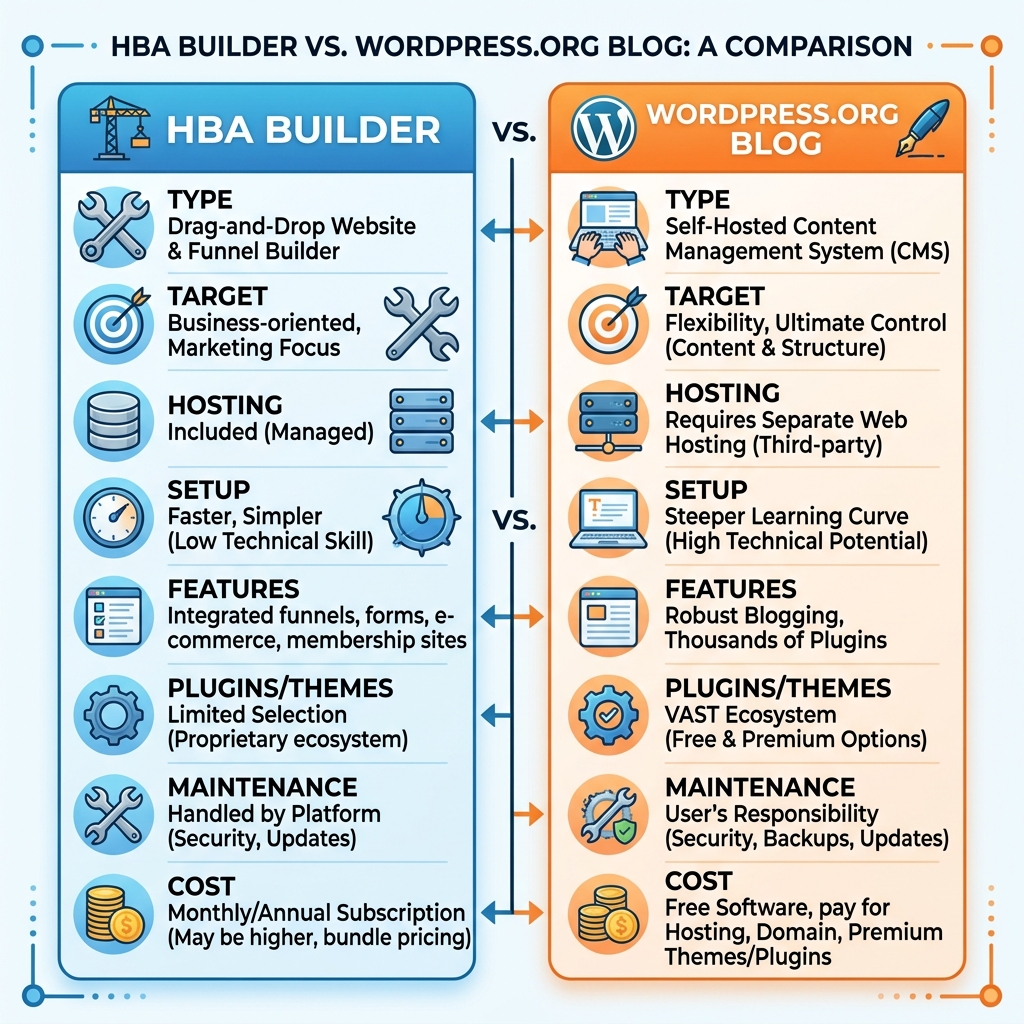
Blog in Builder by HBA
The HBA Funnel Builder that I use to create my optin pages and funnels also includes a facility to add blogs. An amazing 50 possible sites for just $25 per month, and that also includes an auto-responder and page builder,
• Your blogs are built into Funnel Builder by HBA, and hosting is included in your plan with no extra hosting fee.
• You get one blog per site, and you can have up to 50 sites. Each site can have its own domain.
• You write, publish and design posts in the Blog tab at the top of the Builder, and you can add categories.
• It can import an existing blog’s posts with their dates, categories, tags and pictures. Comments come over too if the old blog is WordPress. The import doesn’t move a WordPress theme, plugins or other pages.
If you are new to blogging, Funnel Builder by HBA is a ten-year old company with impeccable credentials, and although I haven’t tried the blogs myself (because I use WordPress.org) everything else I use there is 100% perfect.
Self-hosted WordPress (WordPress.org):
HBA doesn’t provide the WordPress software or hosting. It does include training on setting up a self-hosted WordPress blog.
If you need specific WordPress plugins or themes, your need for those should be weighed against the Builder’s built-in blog designs.
Where do I Host my Blogs?
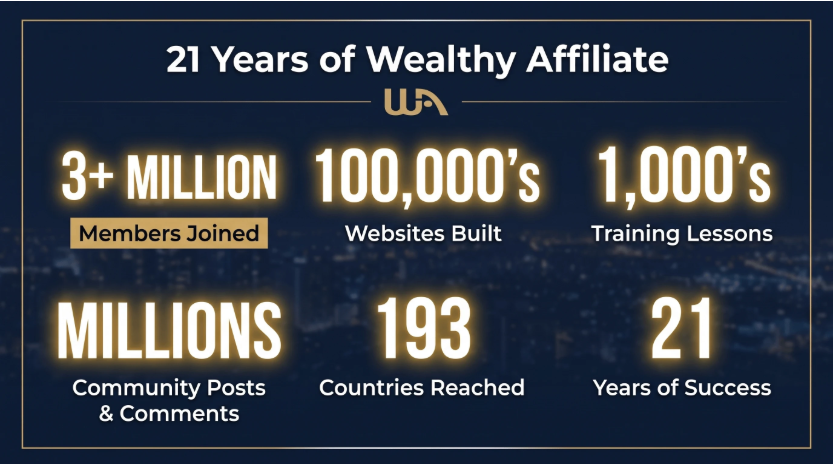
My own blogs are hosted at Wealthy Affiliate because they are well-established blogs, already using plugins and themes, and I was too committed to the WordPress.org self-hosted platform to move elsewhere. I strongly recommend Wealthy Affiliate and their training, and they have been hosting blogs and training on blogging for over 21 years.
Wealthy Affiliate has recently undergone a massive redevelopment and is now AI-assisted. So when I recently moved one blog from a different hosting platform, to consolidate both on the same WA hosting platform, the AI handled everything for me – all the technical stuff I hate.
You can open a free account and look around here.